Department & care
Building the department's scheduling tool
A shared schedule on a single web page: template week, one tab per activity, month view, sync for the whole team, published online. Built with Claude, step by step.
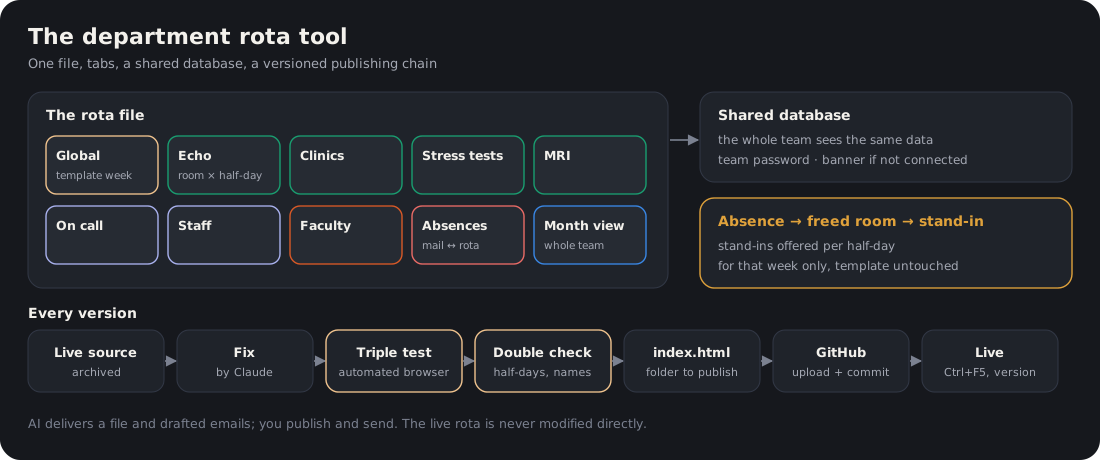
Figure. A single file, one tab per activity, a shared database, and a versioned publishing chain.
The problem
The schedule of a cardiology department involves dozens of staff (senior physicians, clinical fellows, junior doctors, residents) and very different activities: echocardiography by room, clinics, exercise testing, MRI, on-call duty, staff meetings, teaching. It often lives in a spreadsheet that only one person knows how to edit, and every absence sets off a chain of emails.
Step-by-step method
- Write the specification before the code: the list of staff (with their category), the activities, the half-days, who may edit what. Claude drafts it from your notes and the existing spreadsheet, and lists the ambiguities to be resolved.
- A template week, then real weeks: a “Global” tab describes everyone’s standard week; the real weeks are derived from it and never modify the template.
- One tab per activity: Echocardiography (by room and half-day), Clinic, Exercise testing, MRI, On-call, Staff meetings, Faculty, Absences, and a month view showing everyone.
- A single HTML file, with no server to maintain: Claude builds it, you open it in the browser to test it.
- A shared database so that the whole team sees the same data in real time, protected by a team password. The file must never contain a frozen copy of the data: a new computer would display an outdated state without warning. A red “not connected” banner flags a computer that is not seeing the real data.
- Publish online: the file is placed in a GitHub repository, which a static host (Netlify, for example) publishes automatically.
- Version it: each release carries a number (v38, v39…) visible in the page title; the old version is archived, never overwritten.
- Turn it into a skill: all the lessons learned (bugs, procedure, checks) are condensed into a “planning” orchestrator skill, so they need not be relearned in every conversation.
Deliverable
An online scheduling tool, shared and versioned, and a skill that knows how to diagnose it, fix it and deliver it.
Safeguards
- The production schedule is never modified directly by the AI: it delivers a file, you publish it.
- No patient data in the schedule. Staff contact details stay in the directory, not in the published file.
- The team password appears neither in shared conversations nor in circulated documents.
Starter prompt
Here is our scheduling spreadsheet and the list of staff. Write the specification for a single-web-page scheduling tool: template week, one tab per activity, month view, absences. List what is ambiguous before coding anything.